Vibedrop
Context
A cross-functional course project where UX-designers and developers teamed up to take a digital product from concept to working prototype in twelve weeks. The scope of the MVP was ours to define.
Goal
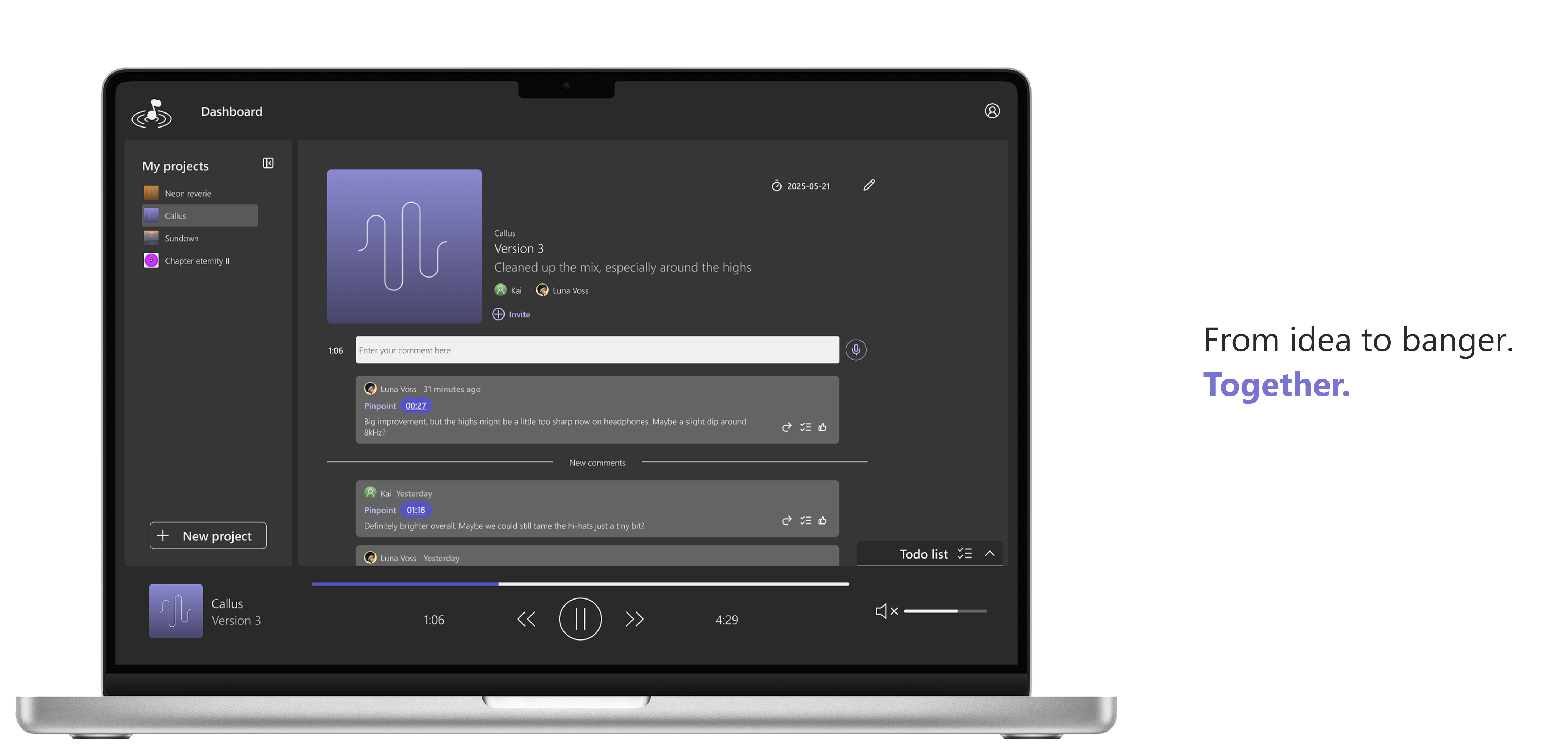
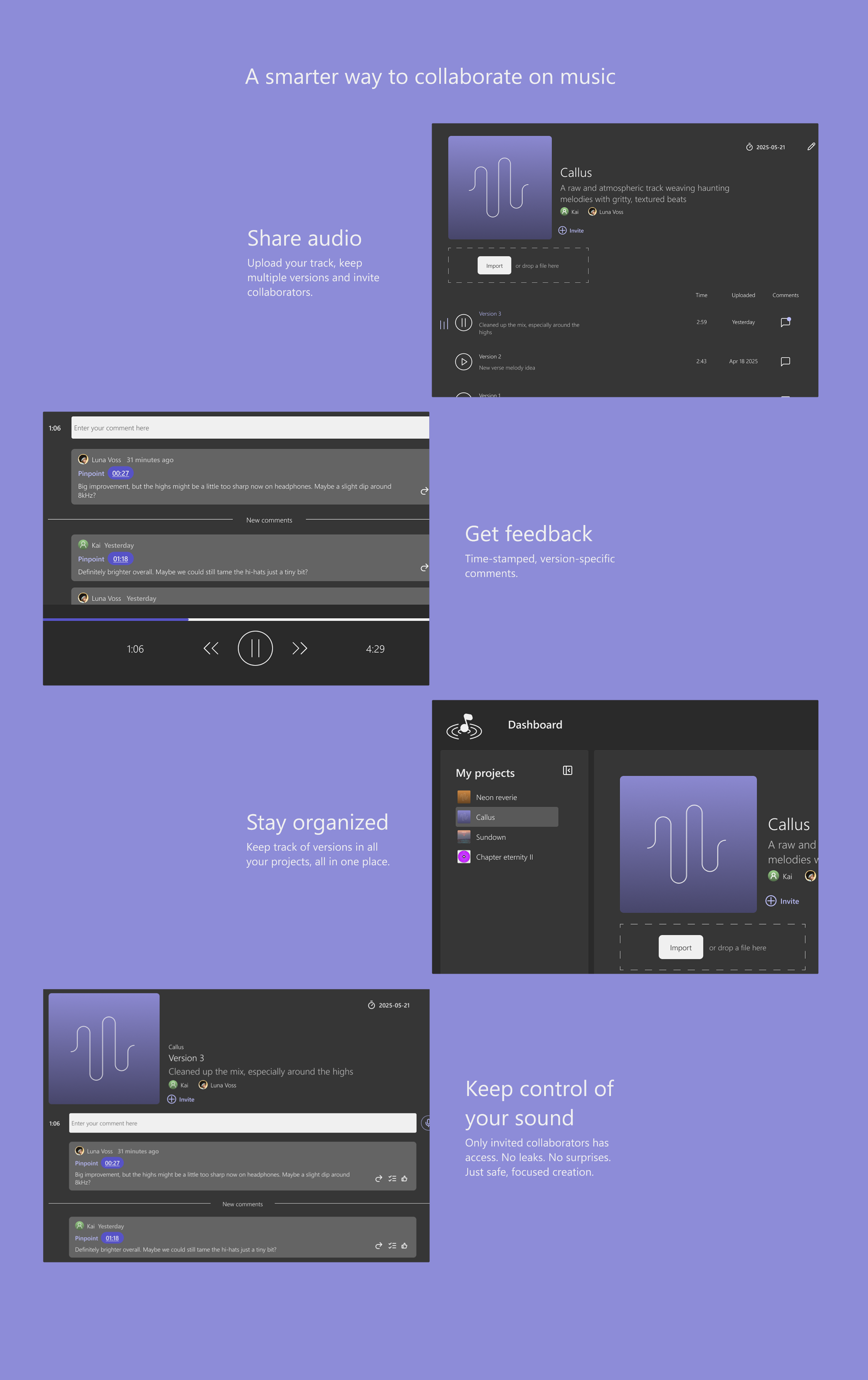
Creating a space where artists and producers can upload tracks, gather and share feedback, and keep everything organized in one place.
My role
Lead UX-designer. I was responsible for research, the UI and design system as well as the UX and design of screens/prototype.
Result
An MVP prototype and design system, scoped down from the market research to the features that carried the most value. Testing changed the design: usability tests with five users showed the sidebar needed deeper structure, and an A/B test with eight users proved the comment timestamp was being read as when the comment was left rather than where in the track it pointed, which led to the reworked comment. I kept working on Vibedrop beyond the MVP, mainly reworking the UI and some of the features.
Duration
12 weeks
Final design
How it works
The promo film for Vibedrop
Greatest insights
Problem
Producers and artists send unfinished tracks through Dropbox or WeTransfer and gather feedback by text, so a song with many collaborators ends up as scattered one-on-one conversations and misunderstandings. Tools built for this exist, but none of the people we spoke to used them.
Design solution
What the research said a tool has to do to be used: keep tracks organized in a file structure, let a comment point at a moment in a version, keep onboarding light enough that a collaborator will actually leave one, protect unreleased work, work on the move, and play audio uncompressed.
Market research
I looked at three existing platforms for sharing music in progress, to find the patterns that already work and the ones worth borrowing for the MVP.
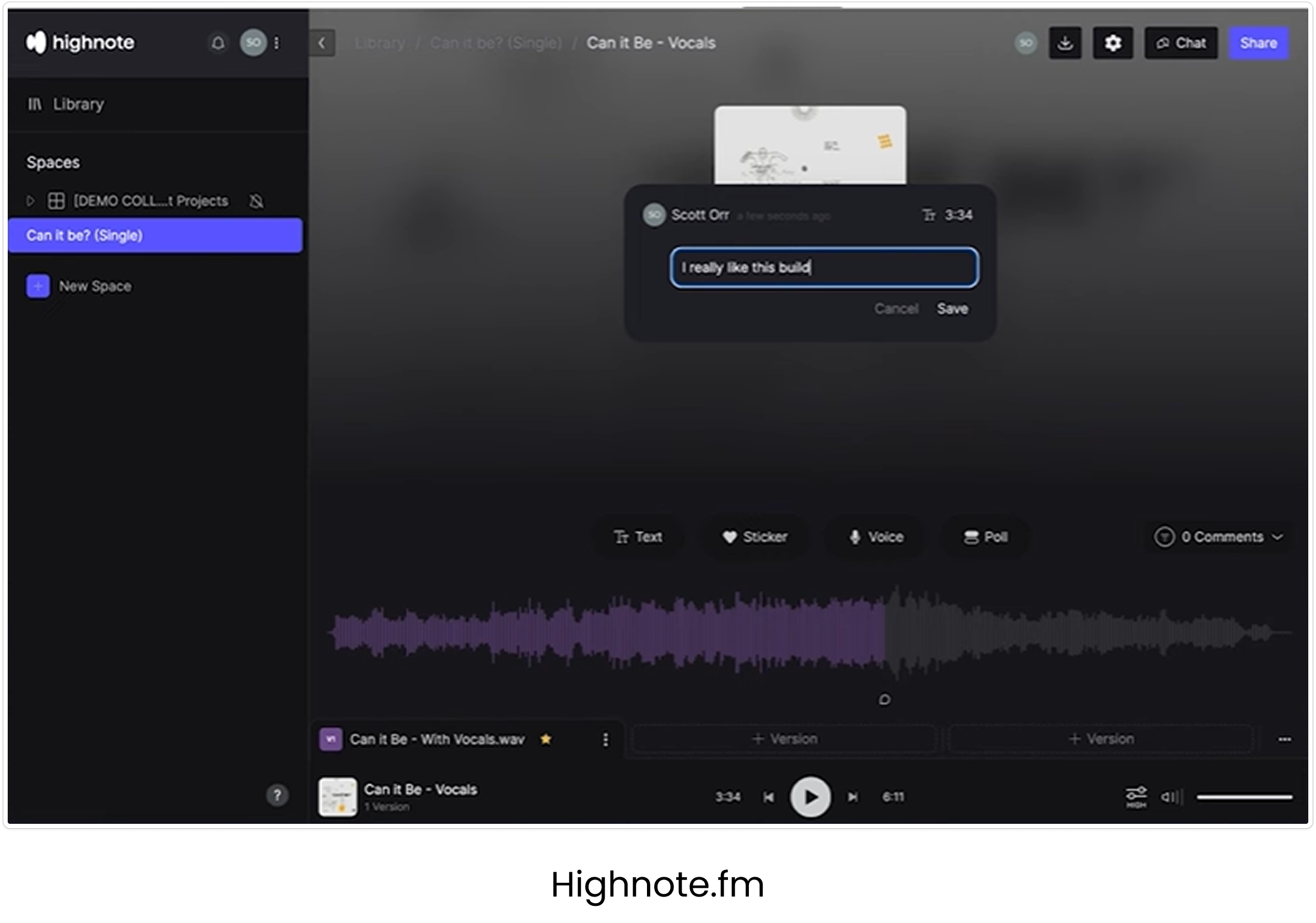
Highnote
Pins representing comments in a visual waveform
Possibility to send voice notes as comments
Ability to toggle between versions
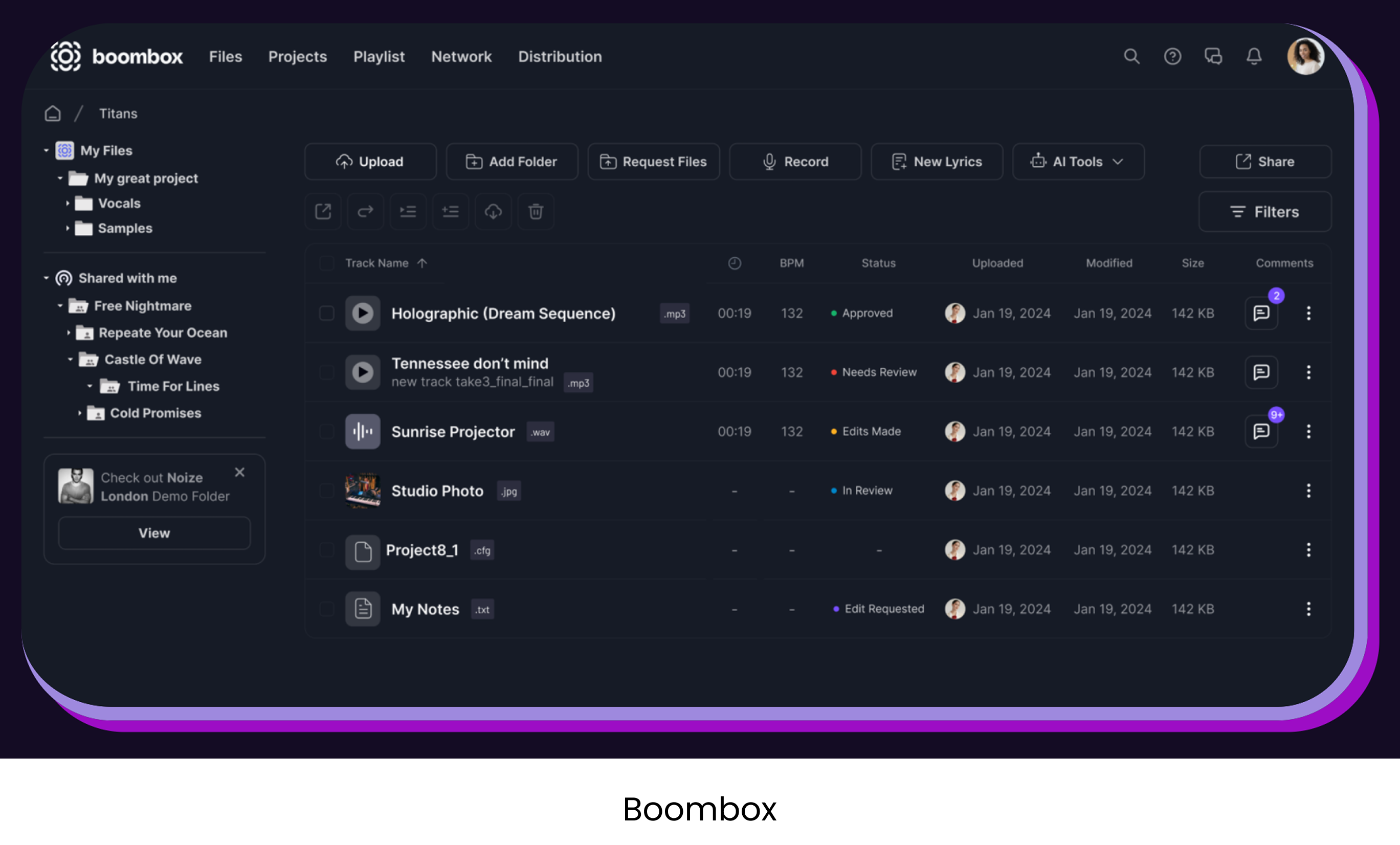
Boombox
Organized file structure
Overview that keeps track of new comments, last modified and status
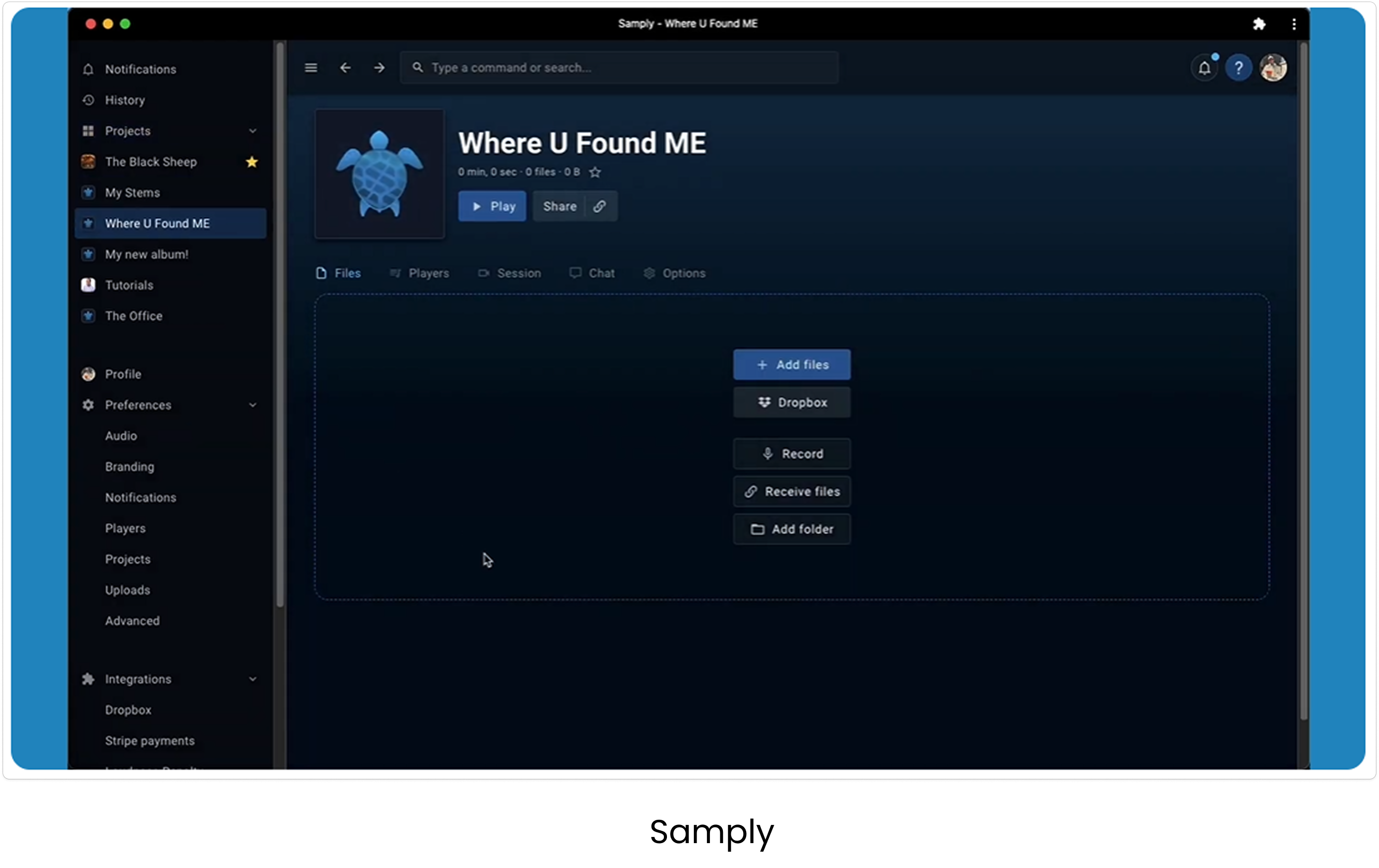
Samply
Drag-and-drop function
Add collaborators, set access for each one
Target group interviews
Count: 5
Producers and artists, both established and hobby musicians
Producers lead the trackProducers are usually like project leaders of a track. Feedback is gathered through text and they send the tracks through Dropbox or similar platforms.
Many people, one-on-one talksA song collaboration can involve many people, sometimes leading to miscommunication since those involved text and call each other one on one.
Fear of theftThe risk of beats or lyrics getting stolen makes many cautious, some only sending their work in progress to friends and family.
Onboarding must be lightComplicated onboardings will hinder collaborators from leaving comments.
Listening on the moveMobility adds value, since they often listen while on the move or want to test the sound on different speakers (such as in the car).
Uncompressed audioThe audio quality needs to be uncompressed to get an accurate experience of the track.
Workshop with the team
I planned and held a workshop for the group, developers included, where I presented the research and the behavioral types of the user group we had found. From there we brainstormed together where to take the project.
This was a team project rather than one with a client, so we all had an equal say in it. Running the workshop was how the research reached everyone at once and became something the whole group decided from, instead of findings only I had read.
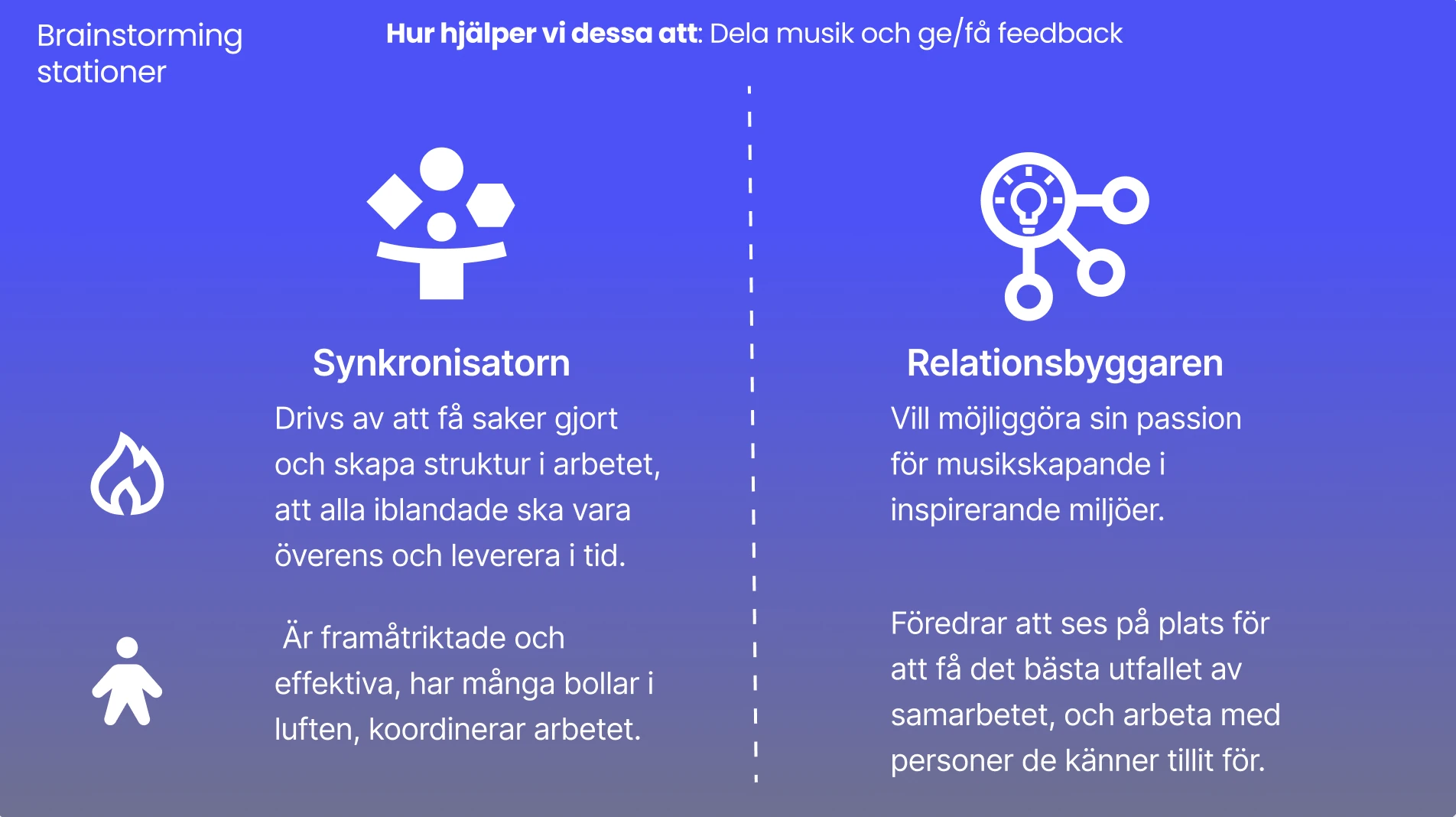
A station per behavioral type, each with the question the group brainstormed against
Usability testing
Count: 5
The prototype was tested on users given these three tasks, as well as discussing the level of structure, safety and familiarity they experienced.
- Start a new project
- Read the latest comments in a project
- Add a new version
Deeper structureMissing the ability for deeper structure in the sidebar, such as grouping projects for an album or genre. Sorting and searching would also add value.
More on the dashboardThe dashboard could include more than just recent activity in project, like overall stats that could be of interest.
Sharing stemsSometimes you want to share a certain part of the track, called ‘stems’. For example it could be a track with only the guitar.
The cover comes lateUsually a picture for the song is not ready at this part of the process, so it doesn’t have to take up such a big part of the interface.
Timestamp misreadThe timestamp in the comments are interpreted as the time the comment was left, instead of the time in the track the comment refers to.
A way backMany of the users were missing a “go back”-button. In case of many projects it would be easier than clicking at the project in the sidebar.
From research to scope
Problem
Twelve weeks, a team of designers and developers, and a market already full of features. The people we interviewed knew the existing tools and still were not using them, so more features was not the answer.
Design solution
A scoped MVP built around what carried the most value: a file structure in a sidebar, and comments with a timestamp on a version, with the waveform pins scaled down. The school project ended there, but I went on working on it afterwards and built it further into a working prototype.
We had to scope an MVP, and the research decided what went in
As this project meant designing and building something from scratch it was needed of us as a group to make a MVP to fit the scope of the project.
From the market research I found that what seemed to be the best practice was a sidebar to the left with a file structure of all tracks in progress. Also, a waveform with pins for the comments was common, but this we scaled down for the MVP. Instead we focused on being able to leave comments on a certain version with a timestamp referring to a time in the track.
People already had tools they were not using
I also found during the interviews that some of them were familiar with the solutions that is found on the market as of now, but neither of them were using them. Everyone was still using Dropbox or Wetransfer to send the tracks and then gather the feedback through text. A more organized way was wanted but still the options out there was not being used. The threshold of usage seemed to be to high. Someone had tried to make their collaborators use a platform for leaving the comments, but they still texted him their feedback. Therefore, we discussed a solution in the group where the users would be able to send a link to an e-mail where the recipient could easily log in with their google account or similar. For this project we did not have the resources to implement it.
And for this reason it can also be useful to scale down to an MVP and work your way forward, to see what really brings the user value.
The MVP is where the school project stopped, but not where I did. Afterwards I kept working on Vibedrop on my own, mainly on the UI but also on some of the features. A lot of what follows is still what was made during the school project.
Fixing a core feature that users misread
Problem
A comment on Vibedrop points at a moment in the track, and it also has a time of its own, when it was written. Both are time, and the component had room for one convention. Every social product teaches that a timestamp next to a name means when something was posted, and usability testing showed that users read it that way. That breaks the feature, because a comment is only useful if it shows where in the track to listen, and a time that looks like a posting time says nothing about that.
Design solution
Testing three ways out showed the time needed a label and a shape. The posting time moved beside the name, where every other product puts it, and the time in the track got its own line, a word and a filled pill, so it reads as a reference to the track rather than as part of the sentence.
I had already pulled the two apart once. Before testing I noticed that ‘00:27’ and ‘31 minutes ago’ sitting on the same line invited the wrong reading, so I moved the posting time up beside the name, where that kind of time lives in every other product. Sat next to a name it tells a small story on its own, Luna Voss, 31 minutes ago, and the reader assembles that without being asked to. That split was right and it is still in the design. It was not enough on its own: the time in the track was now alone on its line with nothing to say what it pointed at.
Testing three ways out
An A/B-test comparing the original design against two iterations.
- Original design
- With a supporting text
- With a supporting icon
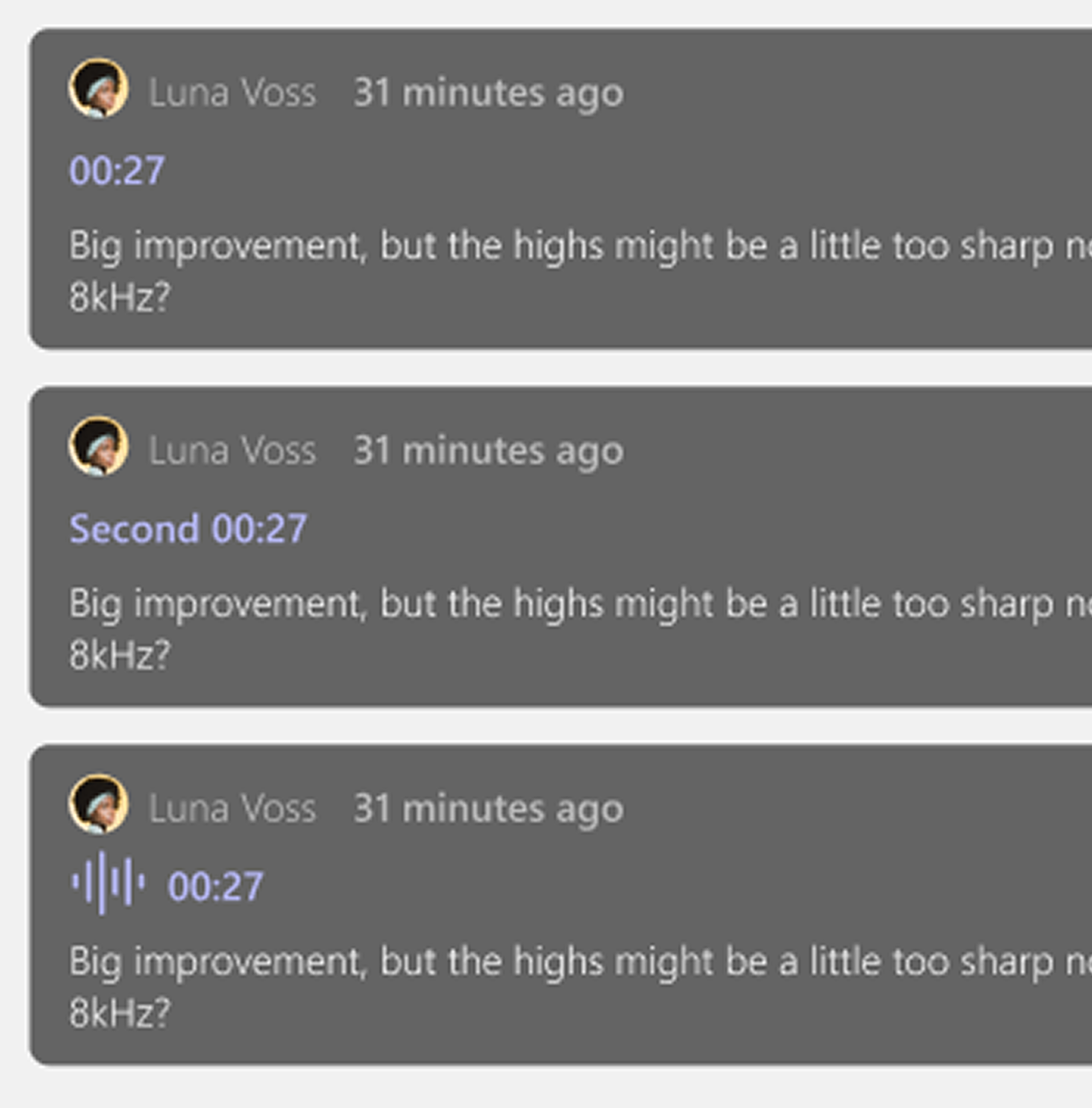
The three variants in the A/B-test
The results were scattered, and that was the finding. None of the three was good enough. A test that produces no winner is less satisfying to report than one that does, but it told me more than a narrow win would have.
The iconThe icon was read as a voice memo. It borrowed a convention that already meant something else in a product full of audio, so it replaced one wrong assumption with another.
The colourThe colour was too light. The time did not separate from the rest of the comment, so it read as part of the sentence rather than as a reference to a point in the track.
The supporting textThe supporting text was the direction people reached for on their own. Testers offered ‘commented on’, ‘pinpoint’ and ‘audio pinpoint’ without being prompted. When users start writing your label for you, the answer is usually a label.
What the three findings pointed at
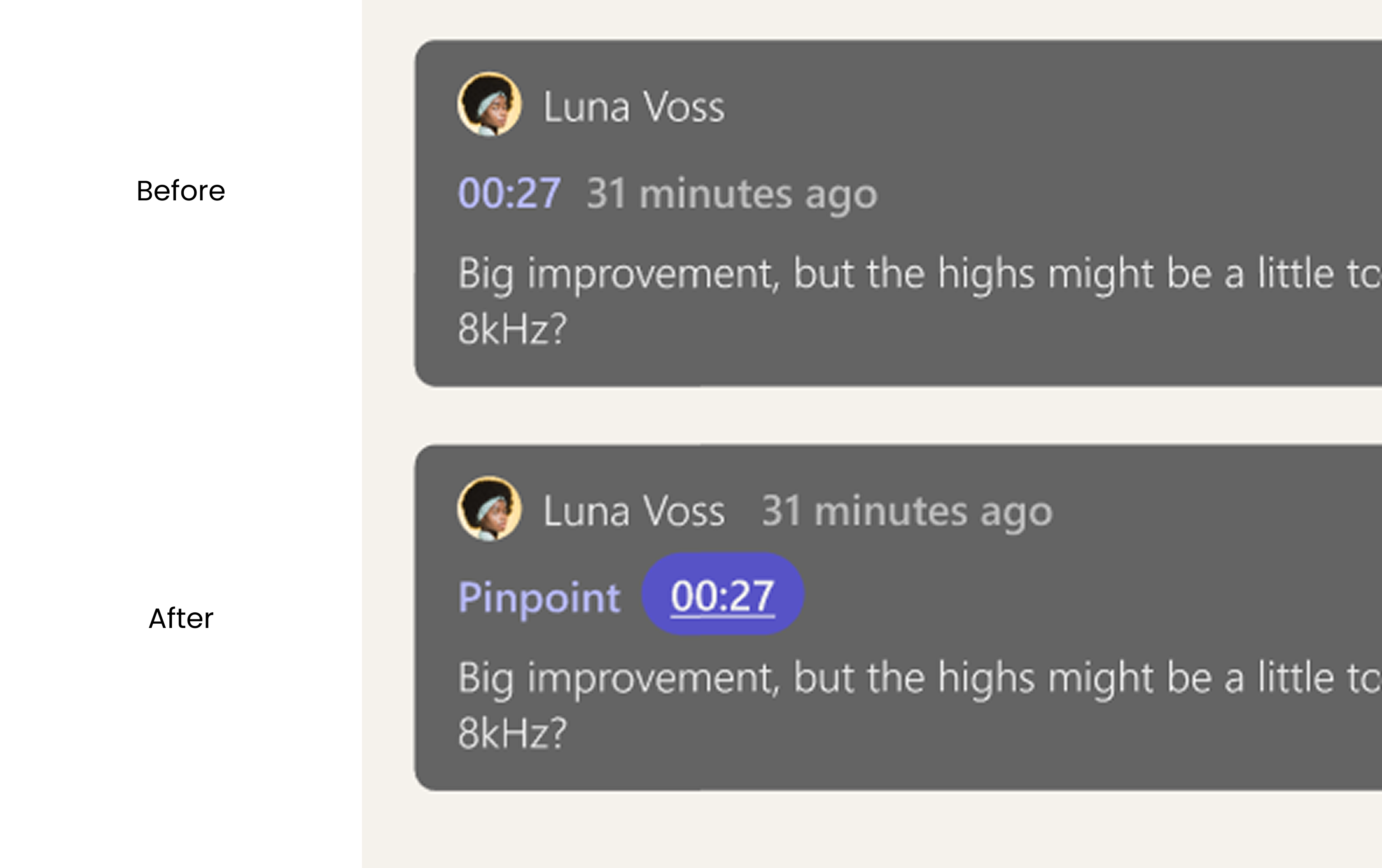
The comment where it started, and where it ended up
Name the relationship in words
An icon cannot carry a meaning the user has not learned, so the fix was to name it in words, and the word came from the testers: Pinpoint was one of the three they offered unprompted. Building it out later I shortened it to at, which does the same work in two characters and matches the chip on the field you type into. What the test settled was that it needed a word at all; which word was the easier question.
The colour problem was not really colour. The time needed to stop looking like part of the sentence, which is a job for weight, case and a container rather than for a shade, so it sits in a filled pill instead of being tinted text in a line of text.
The posting time stays beside the name, where every other product puts it and where it is read correctly without any help from me. The time in the track keeps its own line underneath. The split I had made before the test was the right one; what it had been missing was a label and a shape.
What the interface is made of
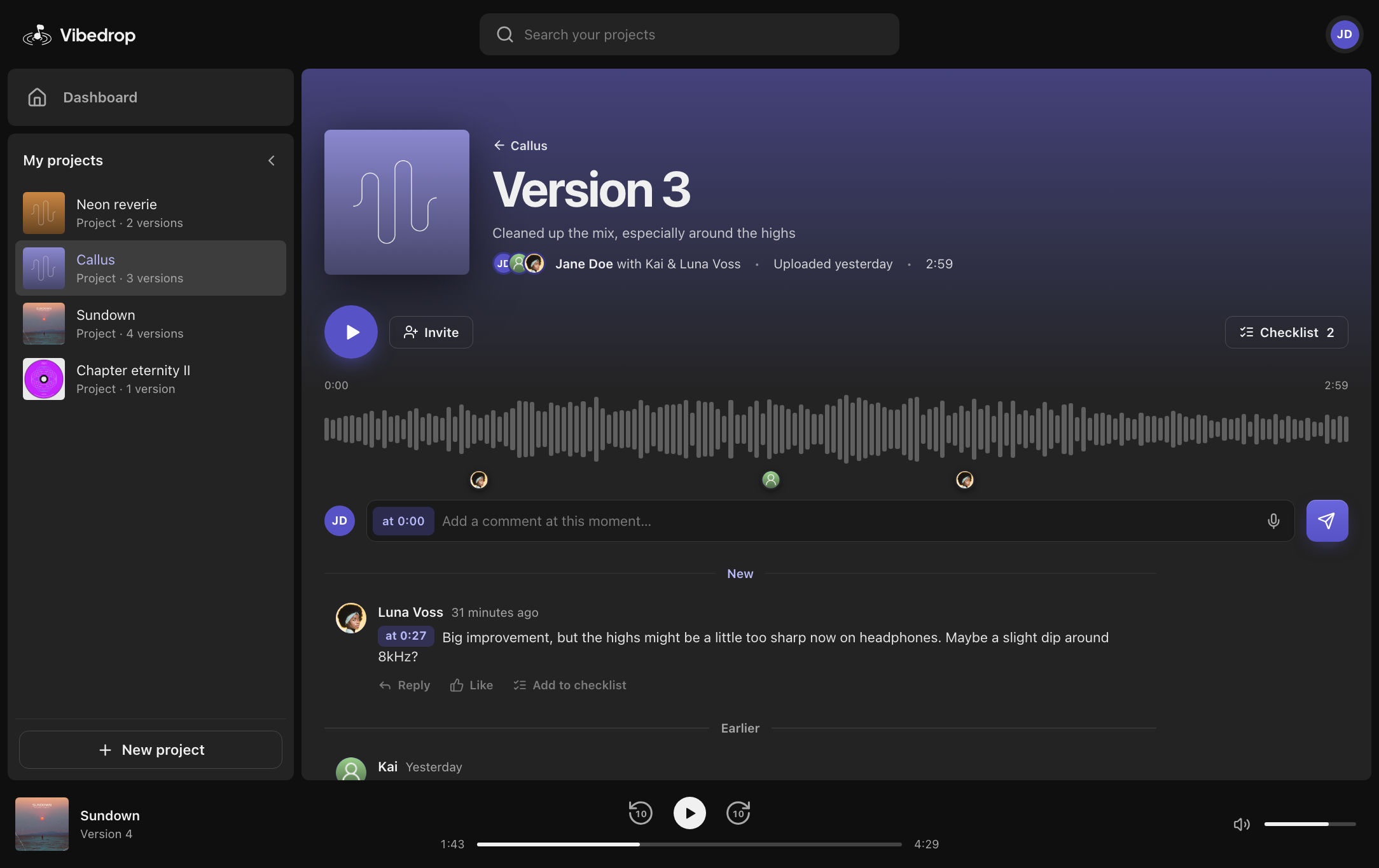
It is dark and dense because that is where this audience already works
The interface is dark because that is what this audience is already inside all day. Every platform in the market research runs dark, so does Spotify, so do the DAWs the work actually happens in, and a bright tool sitting between them would feel like leaving the room. It is also set at app density rather than website density. Small type, tight rows, a lot on screen at once, because these are people who keep a track open for weeks, not visitors reading a page.
The layout is borrowed, so nobody has to learn it
Almost none of the layout is invention, and that is the point. The project tree down the left, the waveform across the middle, the transport docked along the bottom: every one of those came out of the market research or out of the apps our target group already has open. The interviews had told us the real problem was the threshold of getting a collaborator to use anything at all. A layout somebody has to learn is a threshold, so the structure deliberately borrows and spends its originality on the one problem none of them solve well, which is tying a piece of feedback to a moment in the track.
The two new pieces answer where am I and what has changed
The two genuinely new pieces both answer the same question. Where am I, and what has changed. The comment field arrives already stamped with the moment you are standing on, so pointing at a problem costs nothing extra. And the thread splits into New and Earlier, because when you reopen a track after three days, what you want is not everything ever said, it is what has happened since.
The design system
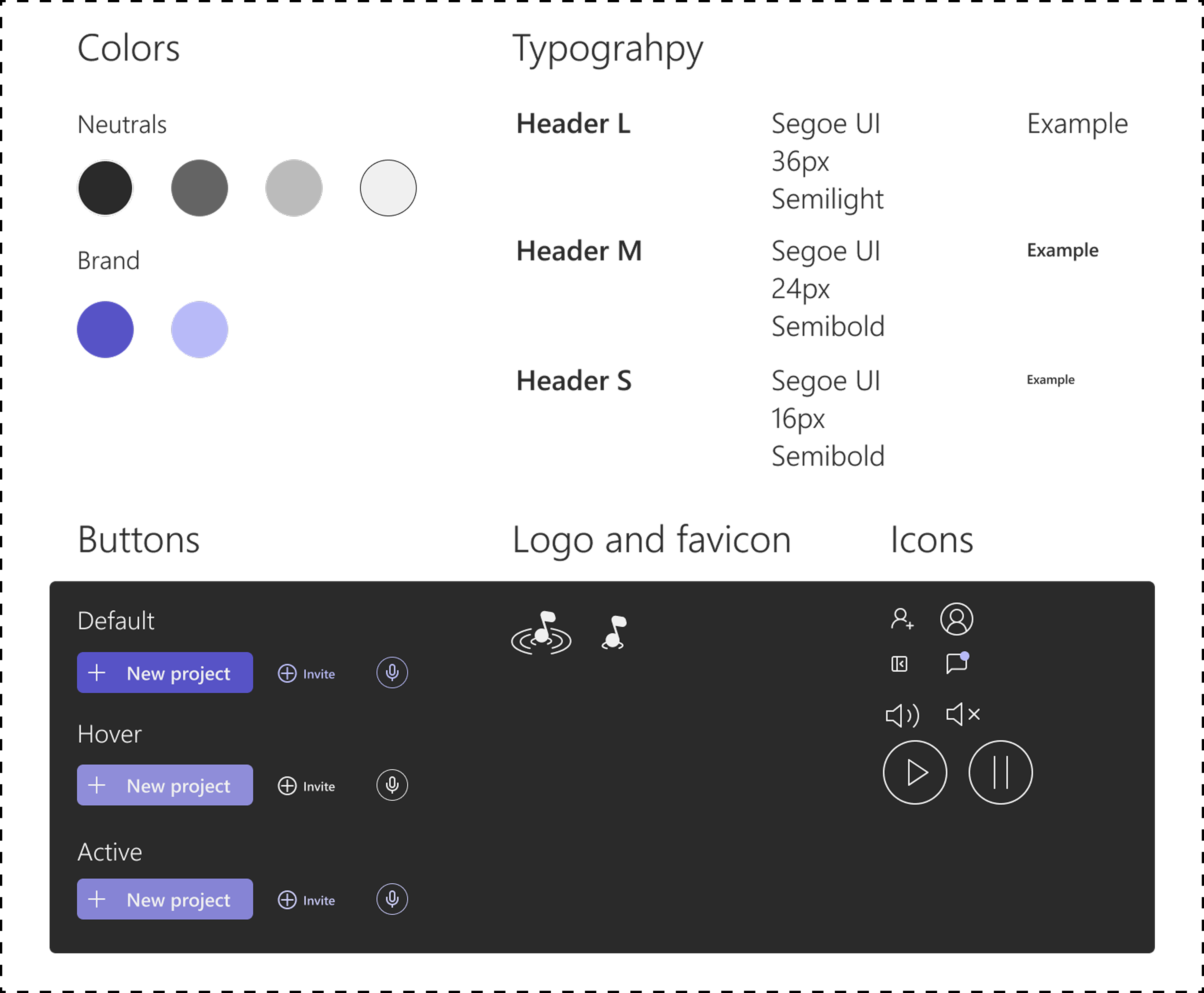
A dark system in a plain sans, with a purple that sits in its category
Dark, for the reasons above, and set in a readable sans. The point was to sit naturally in the company of the tools these users already keep open without copying any of them, so the type does the work the colour is not allowed to: a plain sans at a size that stays legible on a dark surface, which keeps the whole thing feeling modern rather than heavy.
The brand color was the decision we spent longest on. We landed on purple, which is where much of this category already sits, and it does read as convincingly techy. I remember thinking we could have picked something that stood further apart from the field, and that is the call I would look at again. It is a balance though, because a color that stands out still has to feel right for the business area, and on a team project the decision was ours together rather than mine.
Building the prototype grew the design system
The design system here is the one the prototype runs on. It grew while I built the prototype, because working code needs more than a screen in Figma does. Two things were added: four surface colors instead of one, because depth is the only way a dark interface can separate a panel from the page, and a set of small components (avatar, timestamp, chip, assignee and segmented control) that each carry exactly one fact. The picture is read straight out of the stylesheet and the icon set, so it always matches what the prototype uses.
A few rules keep the interface calm
Besides colors and components, the design system holds rules for how they are used. There is one primary button per screen, and everything else is an outline, a word or an icon, so the next action is never competing with four others. On a form the brand color appears only as the focus ring, so the ring cannot be mistaken for decoration. The icons are one stroked set at one weight, so an icon never looks heavier than the label beside it.
Numbers got their own rule. Every figure in the product is set in tabular numerals, so 0:27 and 1:08 are the same width and a thread of timestamps does not twitch as you scroll past it. Nobody notices this when it is right, which is why it belongs in the system rather than being decided again each time.
Fine-tuning the checklist row
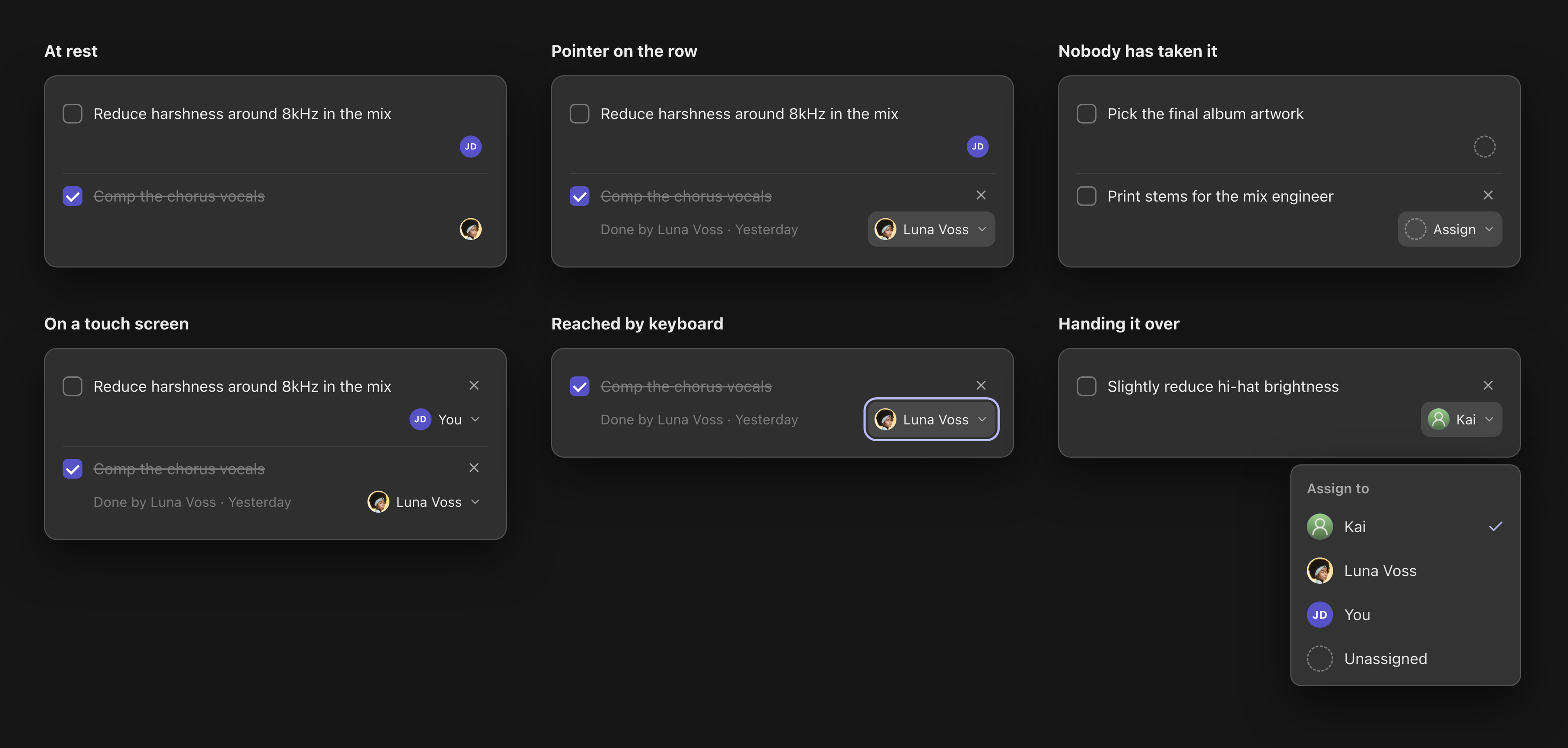
Two facts on every row would have buried the task
Every track has one checklist that everybody working on it shares, and items land on it straight from the comments. That gives each row two separate facts about people: who it is assigned to, and, once it is ticked, who actually did it. Most of the time those are the same person. The times they are not are exactly the times it matters. Luna said she would comp the vocals, Kai ended up doing it, and a week later nobody can remember that.
Both facts could not sit on screen permanently. A row that always reads ‘Assigned to Kai · Done by Luna Voss · Yesterday’ puts three pieces of admin in front of the sentence describing the work, which is what the row is for. In a list of eight that is a wall, and the list stops being scannable at precisely the point it grows long enough to need to be.
So each fact appears when its question is asked
So I split them by the question each one answers. Assignment is what you open the list to find out, what is mine, so it keeps a permanent slot, and it is a face rather than a name because a face answers that question without being read. Who completed something is retrospective: you ask it of one row, not of the list. So it appears only on the row you are pointing at.
The face is also the control. Instead of putting a separate ‘change’ button beside it, the avatar grows a name and a chevron as you approach, and pressing it lists everyone on the track with the current holder ticked. One target doing two jobs, and nothing added to the resting row to pay for it.
Nothing depends on hover, and an unclaimed task looks unclaimed
Hiding controls behind hover has a price, and it has to be paid. An affordance you cannot see is one you may never find, so hover is not allowed to be the only route to any of it. Keyboard focus reveals exactly what the pointer reveals, the button announces itself as ‘Assigned to Kai. Change assignee’ rather than as a picture, and it carries its open state so a screen reader is not left guessing. On a touch screen there is no hover to discover anything with, so nothing hides: names, completion and the remove control are simply there. And the space all of it occupies is reserved in the resting row either way, so revealing it never shifts the sentence somebody was in the middle of reading.
A row nobody has taken had to look different from a row that is someone else's. An empty dashed outline where the face would be, so an unclaimed task reads from across the list instead of being something you work out by elimination.
What I would want to break it with
The prototype runs the happy path well. These are the cases I would design next, and none of them is built yet.
- The holder leaves the track. The face now points at somebody who is not there, and unassigning silently throws away the history. Grey the avatar, keep the name, and say in the row that it needs a new owner.
- A long name on a full row. The name arrives on approach, and it must not push the sentence around while somebody is reading it, so it lifts over the row instead of widening it.
- More than a handful of collaborators. A plain list is right for three people and wrong for twenty. Past a handful it needs a way in by name, with the current holder still at the top.
- A task that outlives its version. A comment on version 2 becomes a task, then version 3 goes up. Whether the task still applies is a real question and nothing currently asks it.
Reflection
What the usability testing led to since
The usability testing gave me several ideas, and some of them I have built since. There is now a search bar in the sidebar, and the comment page has more visual elements showing who left a comment and where in the track, without cluttering the page.
Ideas I have not built yet
Others are still ideas. A more delicate file structure in the sidebar, where you can add folders and drag projects into them, a filtering function, and tabs in the page of a project for dividing the tracks into different ‘stems’. I kept them here because they show what the testing pointed at, and that I turned part of it into something real.